Hi and welcome to Decompiled Art articles!
This is the fifth part of Unity custom Scriptable Rendering Pipeline creation series. This time its about implementing GPU Instancing and dealing with its implementation nuances.
To follow along, make sure to check previous chapters:
Unity Scriptable Rendering Pipeline DevLog #1: Initial Setup
Unity Scriptable Rendering Pipeline DevLog #2: Skybox, Frame Clearing, Geometry Rendering & Culling
Unity Scriptable Rendering Pipeline DevLog #3: Render Errors Detection, UI elements rendering
Unity Scriptable Rendering Pipeline DevLog #4: Multiple Cameras Rendering, Batching, SRP Batcher
GPU Instancing
GPU instancing is a draw call optimisation technique. Its functionality based on rendering multiple copies of a provided mesh with the same material in a single draw call. Each elements/copy of provided mesh is called an instance.
Throughout this article material property values (per mesh instance) will be handled by MaterialPropertyBlock usage.
By default our shader doesn't support GPU instancing. Let's duplicate existing shader and bring some improvements to add GPU Instancing support.
First step is to add #pragma multi_compile_instancing directive
...
#pragma multi_compile_instancing
#pragma vertex vert
#pragma fragment frag
...
multi_compile_instancing directive generates two shader variants. First one with built-in keyword INSTANCING_ON defined - enables GPU instancing usage. Second - without it.
The main purpose of such "branching" is to make sure that: first - its totally under our control whether we want to enable this feature or not, second - if device is not supporting GPU Instancing (outdated/incompatible hardware, etc.), shader version without GPU instancing will be used.
ShaderFeature Vs MultiCompile
In Unity there are several ways for you to "branch" shader variants compilation logic (depending on certain requirements) with usage of conditionals.
- shader_feature
#pragma shader_feature SOME_PROPERTY_ON
shader_feature conditional tells Unity to keep shader variants used by project materials (and will include them into build) and strip (automatic shader variants cleanup) other ones. This way we can make sure that build time and memory usage will be reduced as much as possible.
It means that you should use shader_feature conditional directive for shader's features that should not change their values during runtime.
- multi_compile
#pragma multi_compile QUALITY_TIER_01 QUALITY_TIER_02 QUALITY_TIER_03
multi_compile conditional generates every available logical shader "branches" whether they're used by project materials or not. Opposite to shader_feature, you should use multi_compile conditional directive for shader's features that are changed during runtime. Keep in mind that it comes with increased memory consumption and loading time.
Lets get back to GPU Instancing implementation. So after adding #pragma multi_compile_instancing directive, you should see additional (per-material) property Enable GPU Instancing.
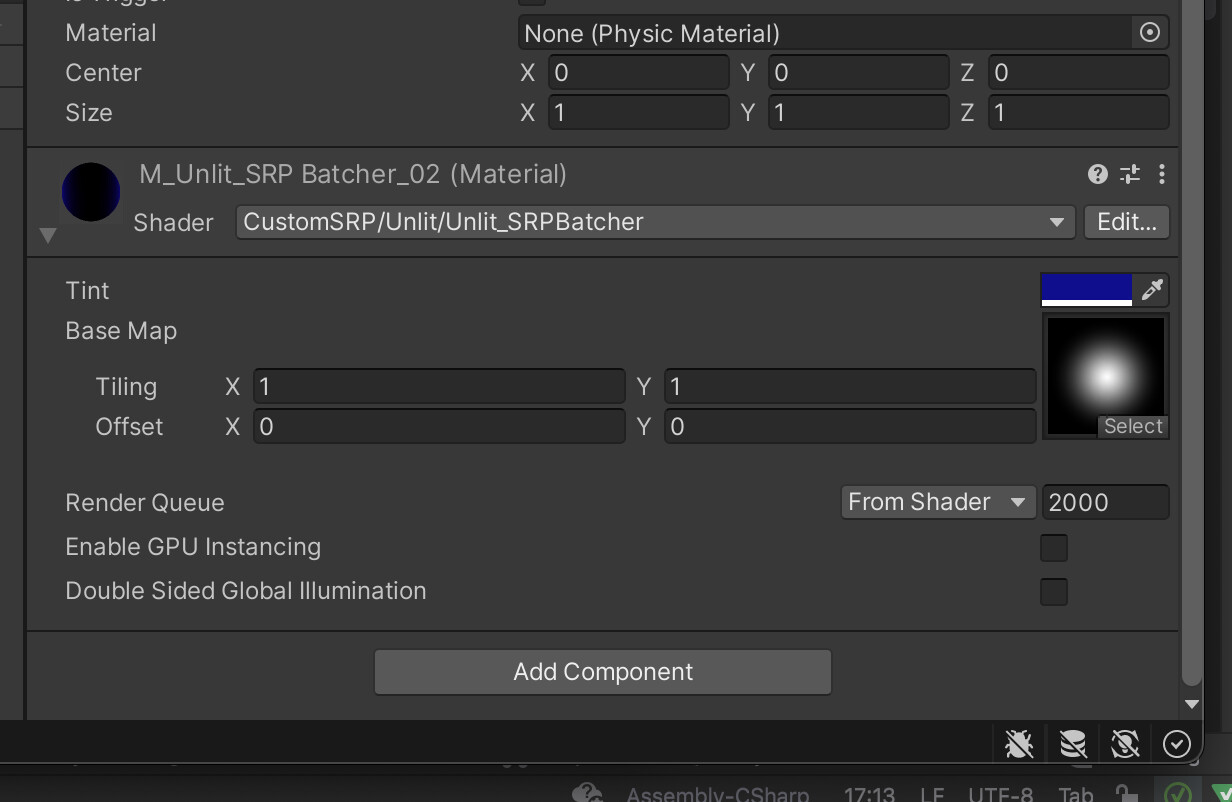
As mentioned previously, through this article we will use MaterialPropertyBlocks to provide each instance with unique material property value. So create new C# script named GpuInstancingTest and add newly created component to test GameObjects. Code follow:
using UnityEngine;


public class GpuInstancingTest : MonoBehaviour
{
    [SerializeField] private Color materialColor;

    private MaterialPropertyBlock _materialPropertyBlock;
    private static readonly int Tint = Shader.PropertyToID("_Tint");


    private void OnValidate()
    {
        _materialPropertyBlock ??= new MaterialPropertyBlock();
        var objectRenderer = GetComponentInChildren<Renderer>();
        _materialPropertyBlock.SetColor(Tint, materialColor);
        objectRenderer.SetPropertyBlock(_materialPropertyBlock);
    }
}
GpuInstancingTest gameObjects setup

We're done with CPU side of things, now lets get back to shader and proceed with GPU Instancing functionality implementation. Here's a full shader's code listing
Shader "CustomSRP/Unlit/Unlit_GPUInstancing"
{
    Properties
    {
        _Tint("Tint", Color) = (1,1,1,1)
        _BaseMap("Base Map", 2D) = "white"
    }

   SubShader {

      Tags { "RenderType" = "Opaque" }

      Pass
       {
           HLSLPROGRAM


           #pragma multi_compile_instancing
            #pragma vertex vert
         #pragma fragment frag


           #include "Packages/com.unity.render-pipelines.universal/ShaderLibrary/Core.hlsl"
         #include "Packages/com.unity.render-pipelines.core/ShaderLibrary/UnityInstancing.hlsl"


           struct Attributes
            {
                float4 positionOS   : POSITION;
               float2 uv           : TEXCOORD0;
              UNITY_VERTEX_INPUT_INSTANCE_ID
            };


            struct Varyings
            {
                float4 positionHCS  : SV_POSITION;
                float2 uv : TEXCOORD0;
               UNITY_VERTEX_INPUT_INSTANCE_ID
            };


           UNITY_INSTANCING_BUFFER_START(GPUInstancedProps)
                UNITY_DEFINE_INSTANCED_PROP(half4, _Tint)
            UNITY_INSTANCING_BUFFER_END(GPUInstancedProps)


           Varyings vert(Attributes IN)
            {
                Varyings OUT;


            UNITY_SETUP_INSTANCE_ID(IN);
              UNITY_TRANSFER_INSTANCE_ID(IN, OUT);
                OUT.positionHCS = TransformObjectToHClip(IN.positionOS.xyz);
               return OUT;
            }


            half4 frag(Varyings IN) : SV_Target
            {
            UNITY_SETUP_INSTANCE_ID(IN);
               return UNITY_ACCESS_INSTANCED_PROP(GPUInstancedProps, _Tint);
            }

           ENDHLSL
        }
   }
}
Lets break it down and take a closer look at what's happening
UNITY_VERTEX_INPUT_INSTANCE_ID
provides vert function and input/output structs (Attributes, Varyings) with instance ID.
UNITY_INSTANCING_BUFFER_START(GPUInstancedProps)
        UNITY_DEFINE_INSTANCED_PROP(half4, _Tint)
  UNITY_INSTANCING_BUFFER_END(GPUInstancedProps)
defines Instancing Buffer for (per instance) properties' values.
UNITY_SETUP_INSTANCE_ID
this line provides shader's functions with instance ID data.
UNITY_ACCESS_INSTANCED_PROP
grants access to per-instance property (uses instance ID as array index)
That's it for GPU side of GPU Instancing implementation.
To test that everything is operational, create new Material with usage of mentioned shader and within components (per gameObject) set various _Tint values. Check results within Frame Debugger
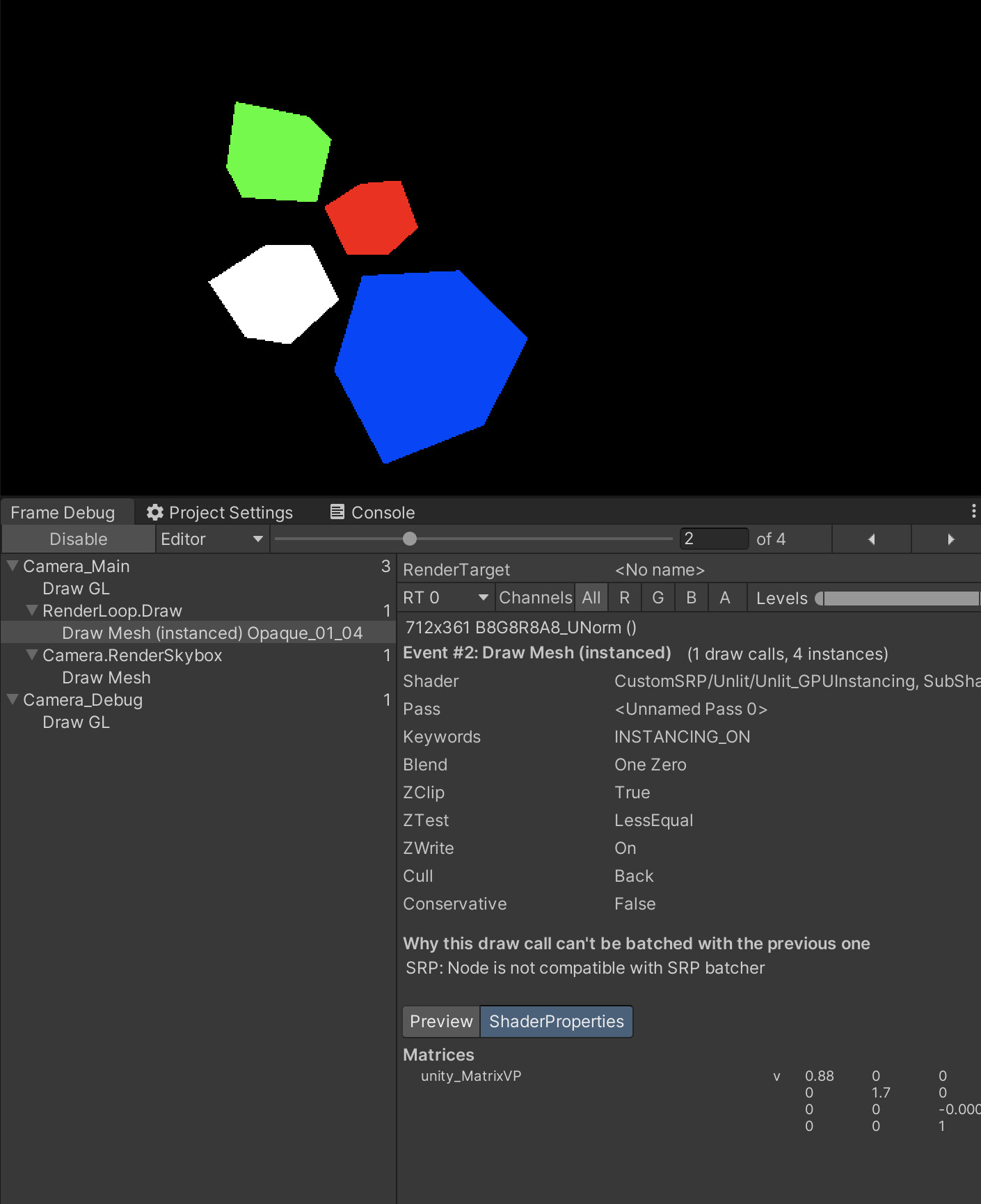
As you can tell, Draw Mesh (Instanced) represent and provides us with a marker that GPU instancing is supported and operational. Congratulations!
Difference between SRP Batcher and GPU Instancing
In chapter 4 of this series we discussed an optimisation concept named SRP Batcher. You may ask what's the difference between SRP Batching and GPU Instancing. Lets make it more clear.
GPU Instancing
1. Collects data from identical meshes which are using the same material with GPU Instancing enabled. (material properties' values modified with MaterialPropertyBlock, DrawMeshInstanced, etc.)
2. Sends collected data to GPU while putting per-instance data into arrays (with instance ID as index).
Pros: because of mesh data being instanced, its very fast to transfer data between CPU and GPU.
SRP Batcher
Collects data from meshes that using same shader (but with different properties' values) and provides this cache to GPU.
Pros: along with draw calls reduction, less data to upload (from CPU to GPU).
And that's it for the basic GPU Instancing implementation within Custom Scriptable Rendering Pipeline. Well done!
Hope you've enjoyed the article and thanks for your time! Stay tuned!
Support Decompiled Art on Patreon

Support Decompiled Art with Ko-fi

***
FOLLOW AND CHECK FOR UPDATES:
Decompiled Art YouTube
Decompiled Art Instagram
Decompiled Art Twitter
Decompiled Art Facebook
***